§ Free tool
What's this website built with?
Find out what any website is built with. This tech stack detector reads a page's code, headers and cookies and recognises over 200 technologies: the CMS or store platform, JavaScript framework, hosting and CDN, analytics and ad pixels, email and chat tools, payments and more.
How detection works
Every platform leaves fingerprints: file paths like /wp-content/ for WordPress or cdn.shopify.com for Shopify, response headers from hosts like Vercel or Cloudflare, cookie names and generator tags. The detector checks one page load against a library of these markers.
Tools that only load on some pages, or after a cookie banner is accepted, may not show. Run it on a product or contact page to see more.
What to do with it
Checking a competitor's stack shows what they invest in: their platform, how they track visitors and which tools they use for email, chat and payments. Comparing two sites side by side makes the differences obvious.
If you like how a site works, we can build something on the same foundations, or move your site to a faster, fully owned platform.
How to read the results
Results are grouped by category: CMS, store platform or site builder, JavaScript framework, hosting and CDN, analytics and tag managers, advertising, email, chat, payments, reviews and more. Where a technology shows its version in the page, the detector shows that too. Some entries are implied by others: finding Elementor means the site runs WordPress, and WordPress means PHP.
An empty category does not prove a tool is absent, only that it left no sign on this page. Server-side pieces such as the database, the service behind a contact form or an internal CRM never reach the browser, so no outside detector can see them. What it reports is reliable; what it misses is usually behind a login or loaded later.
A worked example
Say you run an online furniture shop and a competitor's site feels quicker. Enter their product page and yours side by side. You might find they are on Shopify behind a CDN, with one analytics tool and a reviews app, while your WordPress site loads a page builder, three advertising pixels, two analytics tools and a chat widget.
That does not mean you should copy their platform. It tells you where to look: the scripts your pages load, the weight of the page builder, and whether a CDN sits in front of the site. Our website speed test then shows what each of those costs you, which makes the choice between optimising and rebuilding far easier.
Checking a site by hand
You can often spot the platform yourself. View the page source and search for /wp-content/ (WordPress), cdn.shopify.com (Shopify), static.wixstatic.com (Wix) or squarespace.com (Squarespace), or look for a generator meta tag near the top. In the browser's developer tools, the response headers on the Network tab can name the host or server.
The tech stack detector does the same thing in seconds, across a library of over 200 technologies, including the less obvious ones: headless CMSs like Contentful or Sanity, frameworks such as Next.js or Nuxt, and the tag managers and pixels that marketing teams add over the years. It also saves you knowing which marker belongs to which tool.
How we can help
Wyrelane Solutions is an experienced team that builds and fixes this for clients in the US, UK, Europe and Australia, at fixed prices with weekly demos:
- Custom Web Application Development Custom web development and web application development on React and Next.js: client portals, dashboards, auth and billing, from MVP to production.
- Shopify Development Shopify development company for growing brands: custom themes, headless Shopify, store migrations, Shopify SEO and app integrations, from setup to scale.
- WordPress Development Services WordPress development services: custom themes, headless WordPress, on-page SEO and speed optimization, on a CMS your team can publish from with ease.
Frequently asked questions
How accurate is the tech stack detector?
It only reports technologies it finds clear signs of, so false positives are rare. Things that leave no trace in the page, like a server-side database, cannot be detected from outside.
Is it OK to check another website's technology?
Yes. It reads the same public page and headers any browser receives; nothing private is accessed.
How do I check if a website is built on WordPress?
Look in the page source for /wp-content/ or /wp-includes/, or a generator tag that names WordPress. Or paste the address into the detector above: it checks those markers and the WordPress API link in the headers in one go, and often shows the version too.
Can it tell me where a website is hosted?
Often, yes. Hosts and CDNs such as Vercel, Netlify, WP Engine and Cloudflare add their own response headers, which the detector reads. If a site sits behind a CDN, you see the CDN, and the host behind it may stay hidden.
Is this a free BuiltWith alternative?
For checking a page, yes: it shows the platform, framework, hosting and marketing tools a site uses, free and with no sign-up. It does not keep a history of a site's past technologies or build lists of sites by technology, which paid tools like BuiltWith offer.
Why does it find fewer tools than I expected?
Some tools load only on certain pages or after cookie consent. Try another page of the site.
Can you build a site like the one I checked?
Yes. We build on modern stacks such as Next.js, Shopify and WordPress, and migrate sites between platforms without losing rankings.
Further reading
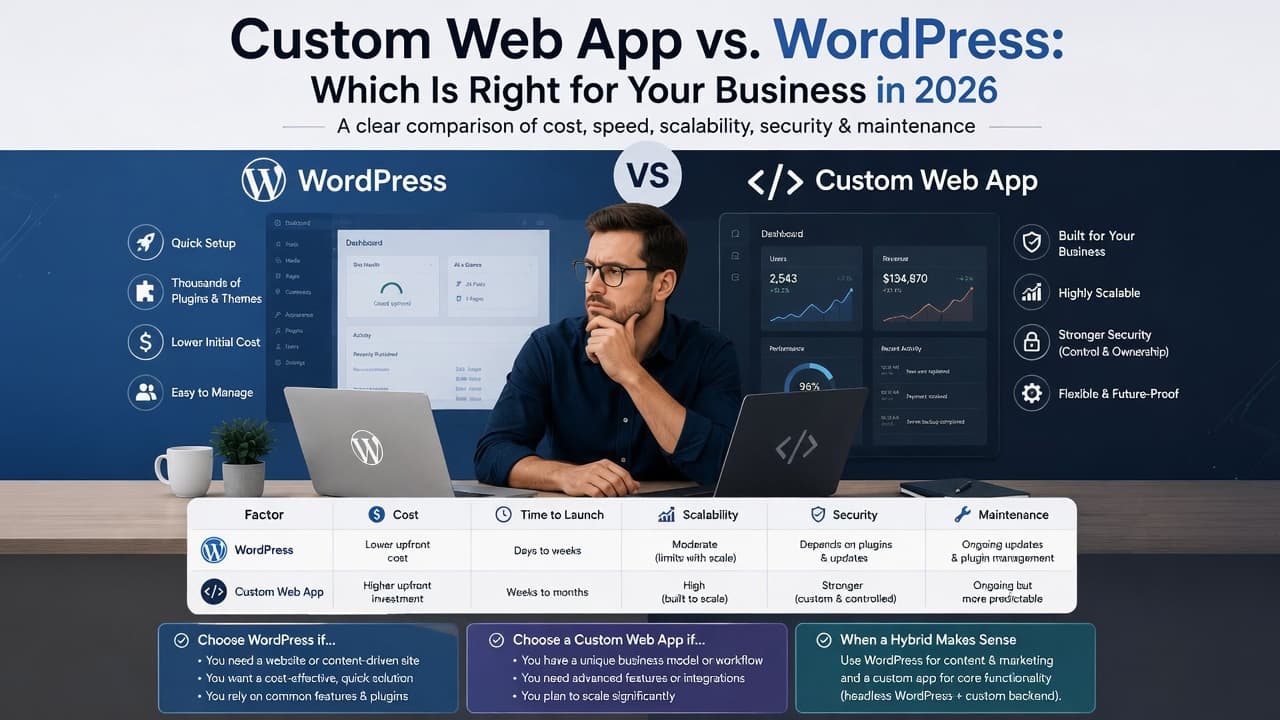
Custom Web App vs WordPress: Which Is Right for Your Business in 2026?
Custom web app vs WordPress: a side-by-side table on cost, launch time, maintenance and security, a quick checklist, and when a hybrid of both is the smart choice.

Headless Commerce: Is It Worth It for Your Store in 2026?
Headless commerce costs more to build and run than a theme store. When it pays off, when it's a costly mistake, what Hydrogen involves, and a checklist to decide.